← All Xero reports
Xero report

Xero unpaid invoices report: a list of what customers owe

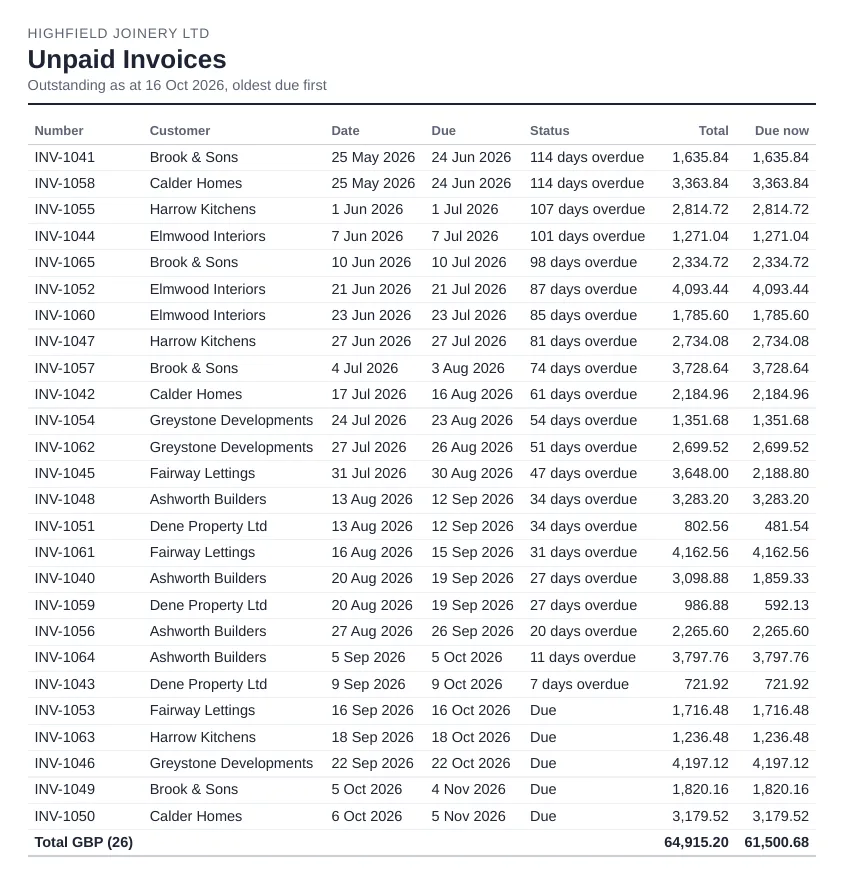
Sometimes a summary per customer isn't enough and you want the actual invoices: number, customer, due date and amount still owed. That's the unpaid invoices list.

Sample Unpaid Invoices report for a demo company, as sent by Reportpost
A sample Unpaid Invoices for a demo company, as Reportpost sends it.

What it shows

  • Each unpaid invoice, credit note and overpayment
  • Due dates, amounts outstanding and how overdue each one is
  • In Xero, extra columns such as expected date and whether the customer has seen the invoice

A list works better than a summary when someone has to act on it. A credit controller can work down it invoice by invoice, ring the customers with the oldest balances first, and see straight away which invoices are only a few days late and which need a firmer reminder.

Where to find it in Xero

The closest Xero report is Aged Receivables Detail (Reporting > All reports).

Settings worth knowing

  • Ageing by due date or invoice date
  • Columns such as expected date and invoice seen

Things to watch out for

  • Like the summary, it's a snapshot at the report date.

Getting it by email on a schedule

Xero can't email reports on a schedule, so the usual routine is to export the report and attach it by hand. Reportpost sends a clean list of every unpaid sales invoice as at the day it sends, with customer, invoice number, dates, amount due and days overdue. Choose weekly, every two weeks, monthly or quarterly, and the recipients. You can try the demo without connecting Xero.

Related: A weekly list of unpaid invoices and Invoice reminder email templates.

Other Xero reports

Xero reportProfit and LossWhat the Xero Profit and Loss report shows, where to find it, the settings that matter (comparisons, tracking, cash or accrual) and how to email it every month.Xero reportBalance SheetWhat the Xero Balance Sheet report shows, where to find it, comparison and tracking options, and how to send it to directors or lenders each month.Xero reportAged Receivables SummaryWhat the Xero Aged Receivables Summary (aged debtors) shows, how to read the ageing columns, key settings and how to get it emailed every week.Xero reportAged Payables SummaryWhat the Xero Aged Payables Summary (aged creditors) shows, its ageing and grouping options, common gotchas, and how to have it emailed before each payment run.Xero reportBank SummaryWhat the Xero Bank Summary report shows (cash received and spent per bank account), its options and gotchas, and how to send it automatically each week or month.Xero reportTrial BalanceWhat the Xero Trial Balance shows, its comparison and grouping options, the gotchas, and how to send it to your accountant at month end.Xero reportExecutive SummaryWhat the Xero Executive Summary includes (cash, profit, balance sheet and key ratios), its options and limits, and how to email it every month.Xero reportBudget SummaryWhat the Xero Budget Summary report shows, how budgets are set up in Budget Manager, and how to send the budget summary on a schedule.Xero reportBudget vs ActualHow to compare actuals with your budget in Xero (Budget Variance), what to look for, and how to have a budget vs actual report emailed every month.Built from your Xero dataCash Flow Statement (indirect)Xero only has a direct-method cash flow statement. How the indirect method works and how Reportpost builds one from your Xero data and emails it.Xero reportInvoices RaisedHow to list the invoices raised in a period in Xero (Receivable Invoice Summary or Detail), the options and gotchas, and how to email the list automatically.Xero reportDraft InvoicesHow to keep track of draft invoices in Xero, why they matter at month end, and how to have a list of drafts emailed to you so nothing is left unapproved.Xero reportUnpaid BillsHow to get a list of unpaid bills from Xero (Aged Payables Detail), what it shows, and how to have the list emailed to you the day before each payment run.

Next month's pack could send itself.

Reportpost emails your Xero reports on a schedule, as PDF, Excel or CSV. 14 days free, no card.