← All Xero reports
Xero report

Xero Budget Summary report: budgets by period

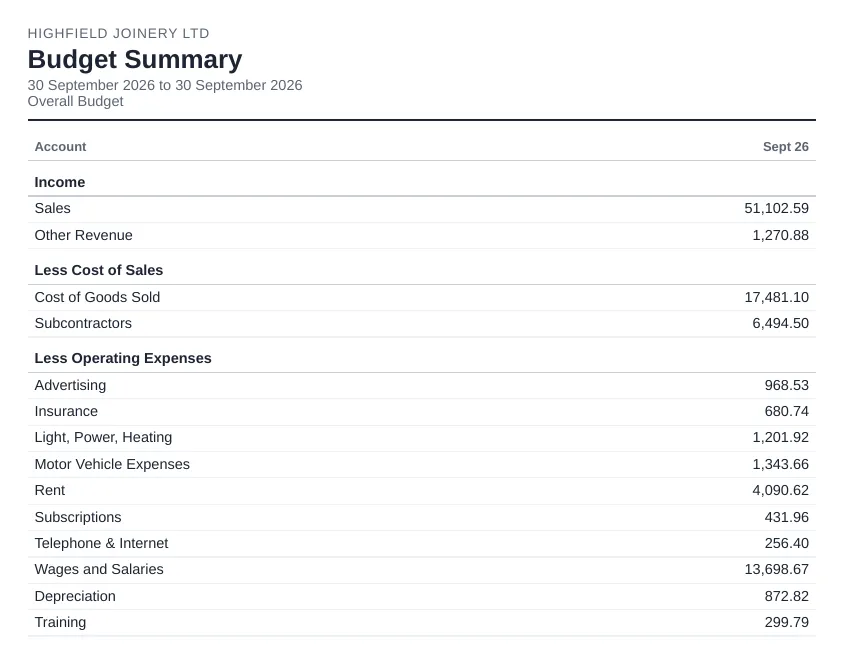
The Budget Summary shows the budgeted income and expenses for each period. It's useful alongside the Profit and Loss when you want people to see the plan as well as the actuals.

Sample Budget Summary report for a demo company, as sent by Reportpost
A sample Budget Summary for a demo company, as Reportpost sends it.

What it shows

  • Budgeted revenue and expense accounts by period
  • The overall budget or one of your additional budgets
  • Optional row totals and account codes

Where to find it in Xero

Reporting > All reports > Budget Summary (New).

Settings worth knowing

  • Choose the budget, the date range and how many future periods to show
  • Budgets themselves are built in Budget Manager: there's one overall budget, and you can add more budgets, with or without a tracking category

Things to watch out for

  • It only shows something if a budget has been set up.
  • Budget amounts round to whole units.

Getting it by email on a schedule

Xero can't email reports on a schedule, so the usual routine is to export the report and attach it by hand. Reportpost sends Xero's Budget Summary for the months in your chosen period. If a report can't be produced, the rest of the pack still goes out and the email says which report was missing. Choose weekly, every two weeks, monthly or quarterly, and the recipients. You can try the demo without connecting Xero.

Related: Free tool: fill the Xero budget import template and Budget vs actual, emailed monthly and Sending monthly management accounts.

Other Xero reports

Xero reportProfit and LossWhat the Xero Profit and Loss report shows, where to find it, the settings that matter (comparisons, tracking, cash or accrual) and how to email it every month.Xero reportBalance SheetWhat the Xero Balance Sheet report shows, where to find it, comparison and tracking options, and how to send it to directors or lenders each month.Xero reportAged Receivables SummaryWhat the Xero Aged Receivables Summary (aged debtors) shows, how to read the ageing columns, key settings and how to get it emailed every week.Xero reportAged Payables SummaryWhat the Xero Aged Payables Summary (aged creditors) shows, its ageing and grouping options, common gotchas, and how to have it emailed before each payment run.Xero reportBank SummaryWhat the Xero Bank Summary report shows (cash received and spent per bank account), its options and gotchas, and how to send it automatically each week or month.Xero reportTrial BalanceWhat the Xero Trial Balance shows, its comparison and grouping options, the gotchas, and how to send it to your accountant at month end.Xero reportExecutive SummaryWhat the Xero Executive Summary includes (cash, profit, balance sheet and key ratios), its options and limits, and how to email it every month.Xero reportBudget vs ActualHow to compare actuals with your budget in Xero (Budget Variance), what to look for, and how to have a budget vs actual report emailed every month.Built from your Xero dataCash Flow Statement (indirect)Xero only has a direct-method cash flow statement. How the indirect method works and how Reportpost builds one from your Xero data and emails it.Xero reportUnpaid InvoicesHow to get a list of unpaid invoices from Xero (Aged Receivables Detail), what it shows, and how to have the list emailed every week.Xero reportInvoices RaisedHow to list the invoices raised in a period in Xero (Receivable Invoice Summary or Detail), the options and gotchas, and how to email the list automatically.Xero reportDraft InvoicesHow to keep track of draft invoices in Xero, why they matter at month end, and how to have a list of drafts emailed to you so nothing is left unapproved.Xero reportUnpaid BillsHow to get a list of unpaid bills from Xero (Aged Payables Detail), what it shows, and how to have the list emailed to you the day before each payment run.

Next month's pack could send itself.

Reportpost emails your Xero reports on a schedule, as PDF, Excel or CSV. 14 days free, no card.