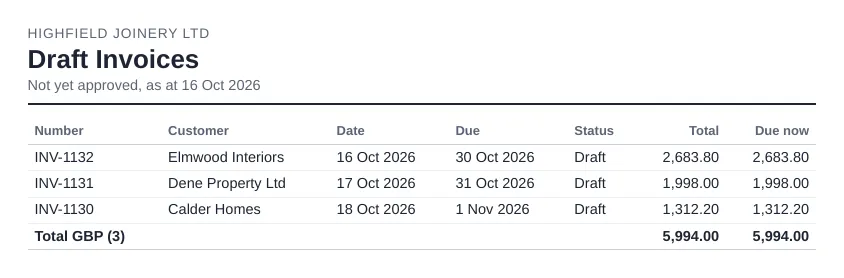
What it shows
- Every draft or awaiting-approval sales invoice, with customer, date and amount
This matters most at month end. An invoice left in draft on the last day of the month misses that month's sales and debtors, so the Profit and Loss and aged receivables are understated until someone approves it. A short list of drafts a day or two before close is the easiest way to catch them.
Where to find it in Xero
Xero has no dedicated draft invoices report, so drafts are usually checked by hand in the invoices list under Sales.
Things to watch out for
- Drafts don't appear in the Profit and Loss or aged reports until approved.
Getting it by email on a schedule
Xero can't email reports on a schedule, so the usual routine is to export the report and attach it by hand. Reportpost can email a list of draft and awaiting-approval sales invoices, for example every Friday or the day before month end, so someone approves or deletes them in time. Choose weekly, every two weeks, monthly or quarterly, and the recipients. You can try the demo without connecting Xero.
Related: Xero month-end checklist and A weekly list of unpaid invoices.