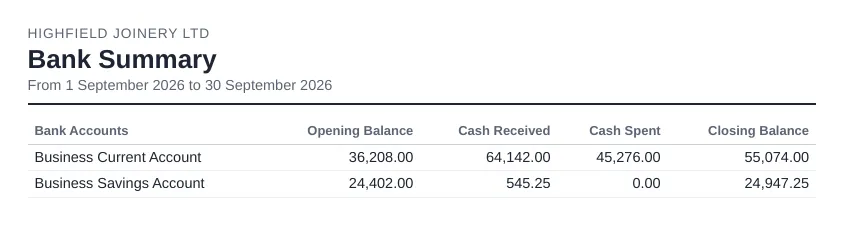
What it shows
- Cash received and cash spent for each bank and credit card account
- An extra column for bank revaluation gains or losses when you use multicurrency
- Grouping by bank account type by default
Where to find it in Xero
Reporting > All reports > Bank Summary.
Settings worth knowing
- Date presets
- Grouping by bank account type or status
- Filters, including by tracking option
Things to watch out for
- Invoice and bill payments only appear once reconciled; spend and receive money and transfers show straight away.
- Totals can differ from the dashboard's "Total cash in and out" chart, which leaves out transfers.
Getting it by email on a schedule
Xero can't email reports on a schedule, so the usual routine is to export the report and attach it by hand. Reportpost sends the Bank Summary for the period you choose, for example last month or last week, as PDF, Excel or CSV. Choose weekly, every two weeks, monthly or quarterly, and the recipients. You can try the demo without connecting Xero.
Related: Xero cash flow reports explained and Emailing the Xero bank summary report and Xero month-end checklist.